RDP Port Security Risk
RDP Port Security Risk
Using the default Remote Desktop Protocol (RDP) port 3389 might offer a number of security hazards if not managed appropriately. Here are the primary problems and some mitigating strategies
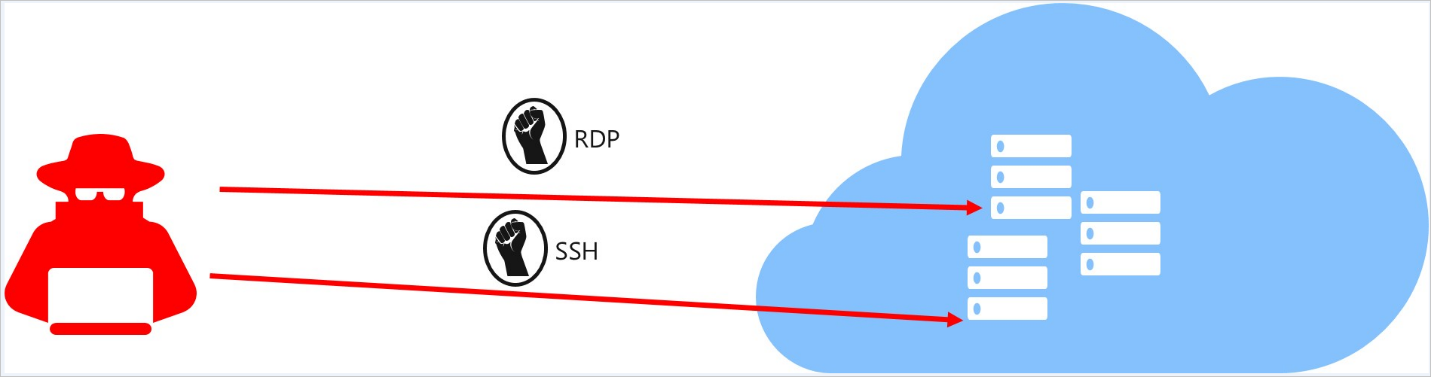
Security Risks
Brute Force Attack:-
Automated applications are used by attackers to check for open RDP ports and carry out brute force attempts to acquire access.
Vulnerability Exploitation
RDP has a history of vulnerabilities, like BlueKeep, which might allow attackers to execute code or distribute malware.
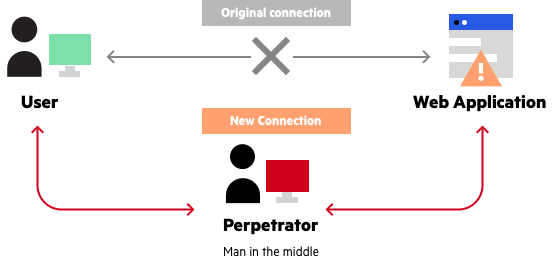
Man-in-the-Middle (MitM) Attacks
Without encryption and authentication, attackers can intercept RDP communication and steal sensitive data.
Unauthorized Access
Weak or default passwords might allow unauthorized access to the system, perhaps leading to data breaches or harmful activity.
Ransomware
RDP is commonly used for ransomware attacks, where attackers encrypt data and demand a fee to decrypt it.

Mitigation Strategy:
- Change the Default RDP Port: - Changing the default port from 3389 to a non-standard port will help reduce the possibility of automated incidents of assault.
- Use Strong Passwords:- Make sure that any accounts with RDP access have strong, challenging passwords.
- Enable Network Level Authentication (NLA): NLA provides a higher level of protection by requiring the user to authenticate before establishing a session.
- Use a VPN:- RDP access should be restricted to those who are connected over a Virtual Private Network (VPN).
- Limit User Access:- Only grant RDP access to those who absolutely require it, and revoke access when it is no longer needed.
- Enable Two-Factor Authentication (2FA): 2FA provides an extra degree of protection for RDP access.
- Regularly Update and Patch Systems: -Make sure that all systems, including RDP servers, are up-to-date with the most recent security updates.
- Implement Account Lockout Policies: -To avoid brute force attacks, configure account termination policies that lock accounts after a certain number of failed login attempts.
- Monitor RDP logs: Regularly check and study RDP logs for any unexpected or illegal access attempts.
- Use Firewalls:-Configure firewalls to restrict access to the RDP server based on IP address or geographic area.
Implementing these measures can greatly decrease the security risks associated with RDP usage while also protecting your systems from unwanted access and other threats.
Related Articles
Updating Port Description on Mellanox Switches like QM9700
Objective To update the description for multiple InfiniBand (IB) ports on a Mellanox QM9700 series switch using the web interface. Prerequisites Administrative access to the Mellanox QM9700 switch's web interface. A pre-prepared list of commands with ...Accessing Services Running on a Different Network via Jumphost using SSH Local Port Forwarding
Objective Learn how to access services hosted on a remote network (such as an internal web server or application) from your local machine by leveraging a jumphost (also known as a bastion host) and SSH local port forwarding. What is SSH Local Port ...How to Enable Split Port on NVIDIA QM9700 Switch
Overview This guide explains how to enable split ports on the NVIDIA QM9700 InfiniBand switch, using both the Web GUI and CLI methods. Split ports allow a single high-speed port to be divided into multiple lower-speed logical ports, providing greater ...AOC-A25G-B2SM has Standby Power disabled by default due to potential overheating risk
Do not change the jumper settings for AOC-A25-B2SM cards. Follow the procedure to validate the AOC. Do NOT use unsupported jumper setting. Do NOT use BIOS and BMC to detect NIC presence before boot. To avoid booting Production OS after service: use ...MOP_ASUS_Server_NIC_Reseating
Method of Procedure (MOP) Reseating Two 10G Dual-Port PCIe Network Cards – ASUS Server Summary This Method of Procedure (MOP) describes the safe and controlled process for reseating two 10G dual-port PCIe network interface cards (NICs) in an ASUS ...
Recent Articles
Troubleshooting NVSM Alert NV-CPU-XX – Unrecoverable CPU Internal Error
Purpose This document provides a general troubleshooting procedure for the NVIDIA System Management (NVSM) alert NV-CPU-XX, which indicates that a CPU has reported an internal error. The article outlines how to verify whether the alert represents an ...PCIe Gen5 Switch Board Replacement
1. Objective The objective of this Method of Procedure (MOP) is to safely replace the defective PCIe Gen5 Switch Board in the Supermicro server while minimizing system downtime and ensuring all PCIe devices, including GPUs, NICs, NVMe drives, and ...Local Boot Support for DGX H200 with BCM 11
Overview This Knowledge Base (KB) article explains the supported method for deploying and managing a DGX H200 system using Bright Cluster Manager (BCM) 11 while booting the operating system from the node's local NVMe storage. To be managed by BCM, ...Execution of NVIDIA Field Diagnostic (FD) Tool and Collection of Diagnostic Logs, and troubleshooting of GPU(s) not detected
1. Objective To provide a standardized procedure for executing the NVIDIA Field Diagnostic (FD) tool, verifying GPU status, collecting the required diagnostic logs, and documenting the findings for further analysis. 2. Scope This procedure applies to ...Fiber Optic Bend Radius Measurement and Compliance
1. Purpose This article outlines the procedure for verifying that installed fiber optic cables comply with minimum bend radius requirements. Proper verification prevents signal degradation, ensures optimal optical performance, and protects the ...
Popular Articles
CP Plus Camera and NVR Configuration
NVR Configuration The CP Plus Pro Series of NVRs have been meticulously designed for providing you with upgraded performance and higher recording quality in your IP video surveillance solution. The robust processor that has been inculcated in this ...Kerberos Authentication – Overview
What is Kerberos? Kerberos is a secure authentication method used in our Active Directory (AD) environment (mbuzztech.com). It allows users to: Access multiple systems without re-entering passwords (Single Sign-On – SSO) Log in once Where We Use It ...How to Remove and Reinstall NVIDIA Drivers on Ubuntu
This article provides step by step guide to completely remove existing NVIDIA drivers and reinstall specific version of the NVIDIA driver on the Ubuntu system Prerequisites Administrative (sudo) access to the Ubuntu system. Internet access to ...Personal Computers and Servers - Classification and Point of Contact
We can classify the computers that MBUZZ handles based on their form-factor as below: Tower Workstations, Desktops, Gaming PCs and SFF (Small form factor) PCs fall under this category. These are computers people would use on a desk and rarely move. ...M.2 SSD Tier List
The sequential read and write speeds, which are usually the most advertised number, are not a proper benchmark of real-world performance or the quality of an SSD. This article categorizes and tiers SSDs based on factors like the type of NAND flash, ...