KB 277001 - How to apply RMA on Supermicro Portal.
The following information we need to collect from the customer before applying for RMA on Supermicro portal.
1: Fully filled Mbuzz RMA Form.
2: Correct P/N(Server),S/N(Server), Invoice Copy, complete description of an error, troubleshooting steps taken and pictures of the RMA claimed unit.
3: Complete Address details, it should consist of following details:
4: The RMA process can be initiated by
https://www.supermicro.com/RmaForm/
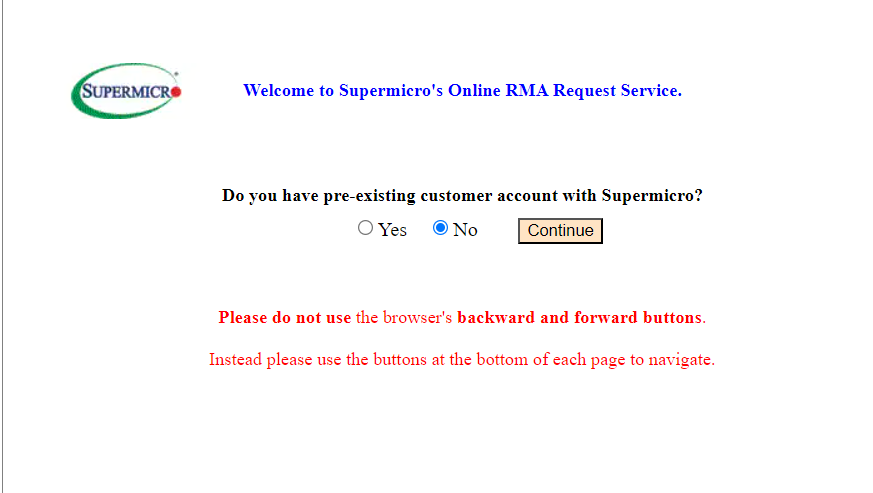
a. Tap on Yes and then Continue.
2: Correct P/N(Server),S/N(Server), Invoice Copy, complete description of an error, troubleshooting steps taken and pictures of the RMA claimed unit.
3: Complete Address details, it should consist of following details:
- Company name:
- Street Address:
- City:
- State/Country:
- Zip Code:
- Phone #:
https://www.supermicro.com/RmaForm/
a. Tap on Yes and then Continue.
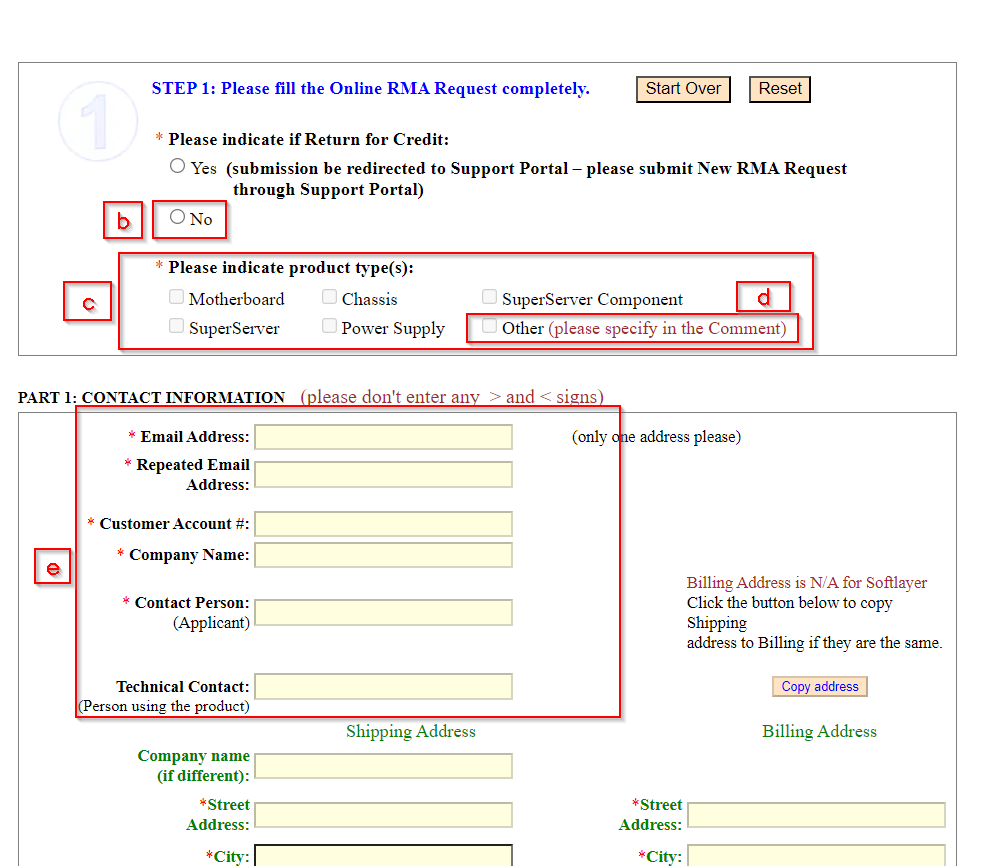
b. Tap on No.
c. Select the issue related with For e.g. Motherboard, Chassis, Super Server Component, Super Server, Power Supply.
d: If issue is related to other field select other and mention in comment section below in form.
c. Select the issue related with For e.g. Motherboard, Chassis, Super Server Component, Super Server, Power Supply.
d: If issue is related to other field select other and mention in comment section below in form.
e:Contact Information
- Email Address: Put your Mbuzz Email address.
- Repeated Email Address: Re-enter your Mbuzz email address.
- Customer Account: MB00090N00 (This Mbuzz Account strictly for Mbuzz employee)
- Company Name: MOBILE BUSINESS COMPANY LTD
- Contact person: Applicant Name (Your Name)
- Technical Contact: MBUZZ Tech Team
f: Shipping Address details:
- Company name: Customer Provided Name
- Street Address: Customer Provided Address
- City: Customer Provided city
- State/Country: Customer Provided State/Country
- Zip Code: Customer Provided Zip Code
- Phone #: Customer Provided Phone number
- Technical Support Contact Name (or Case ID): If you have support case id put support case id or else put Ahmed Mostafa(FAE Supermicro)
- Supermicro Sales Rep. Email Address: Give Ahmend Mostafa's mail I'D: ahmedm@supermicro.com
- Preferred Email Format: Select HTML
- Comment: As mentioned above in (d) if issue is related to other part mention in this comment Box.
g: Billing Address:
- Street Address: Mobile Business Company JSC Dubai Branch
- City: Dubai
- State/Country: U. A. Emirates
- Zip Code: 124452
- Phone #: Your Contact number
h: For repair service: select one of the RMA Regional office nearest to you for shipping the defective items for RMA service.
Note: For Dubai/Saudi Arabia Select Europe Office.
i: Cross-shipment Service Requirement: Please select the RMA Regional office of where the parts were originally purchased from.
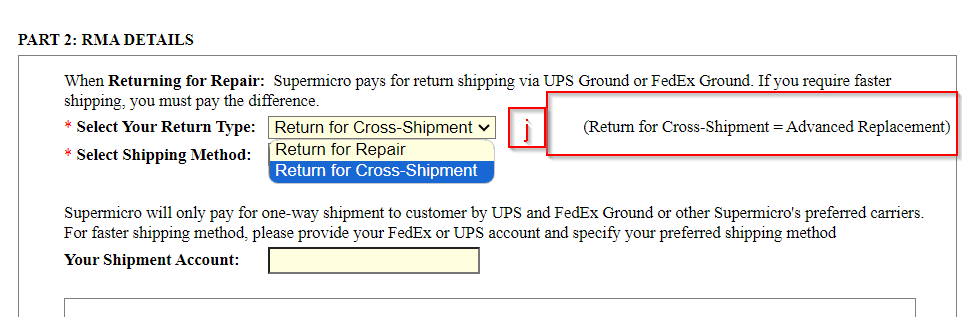
J: For ARS(Advance replacement Service): Select Return for Cross-Shipment = Advanced Replacement.
K: Enter System Serial(Server Serial Number) , Defective Part Model No. Defective Part Serial No., Quantity and Full Description of Problem. If we have multiple Defective Part Model No. Defective Part Serial No., tap on Add Row and fill the required Information.
How to find the Defective Part Model No. and Defective Part Serial No., use below image:
l: After adding all the details tap Continue with step 2.
m: If we have additional system information please fill and click continue with step 3.
n: Check mark Yes, enter the Captcha And tap on submit RMA request.
Related Articles
KB 781029 - New RMA Request - Supermicro
RMA Claim Request Submission For all Supermicro products sold by MBUZZ, the RMA claim must be handled by MBUZZ. MBUZZ must supply the following information to Supermicro to obtain an RMA Claim number. Invoice date Invoice number Product model name ...KB 841009 - How to Apply ASRock RMA
Steps to apply RMA of ASRock devices Login to ASRock RMA portal, click here Link. Provide the credentials. After login you will receive 5 option Apply for RMA : if you want to register new RMA. RMA In Application : if you want to check status of on ...KB 084003 - Supermicro - Frequently Asked Questions
1. Is it possible to get a list of all EOL models in the Supermicro Website? Or is there any list that you can share on a periodic basis? Ans. Supermicro don’t have such list available to share. They can provide the information on a case-to-case ...KB 587301 - RMA FAQ
RMA FAQ What is RMA? Answer: RMA ( Return Merchandise Authorization) is a process that allows customers to return defective or faulty products for repair, replacement or refund as per warranty terms. When should I request RMA? Answer: You should ...KB 112014 - How to troubleshoot Chassis Intrusion Error in Supermicro Server.
What is Chassis Intrusion Error It Is typically means that the system has detected that the chassis or case of the server has been opened or tampered with. This is often a security feature implemented to alert administrators to potential unauthorized ...
Recent Articles
KB-630208 | How to use Find and Locate to search for files in Linux
Purpose To provide Linux administrators and Field Engineers with guidance on using the find and locate utilities to efficiently search for files and directories within a Linux filesystem based on criteria such as name, type, size, timestamps, ...KB-630164 | How to use rsync to Synchronize Files
Purpose To provide a clear and practical procedure for using the rsync utility to synchronize files and directories between local systems and remote hosts, including push and pull operations, while preserving file attributes and optimizing data ...KB-630107 | How to create a Linux swap file
Purpose To provide Field Engineers and Linux administrators with a standardized procedure for creating, configuring, and validating a Linux swap file. This procedure helps ensure sufficient virtual memory is available when physical RAM is exhausted ...MSI All-in-One (AIO) PC – Physical Damage Policy for Warranty Claims
MSI All-in-One (AIO) PC – Physical Damage Policy for Warranty Claims MSI's standard warranty does not cover physical or accidental damage to an All-in-One (AIO) PC. If the damage is determined to be caused by external factors rather than a ...KB 134833 - Troubleshooting NVSM Alert NV-CPU-XX – Unrecoverable CPU Internal Error
Purpose This document provides a general troubleshooting procedure for the NVIDIA System Management (NVSM) alert NV-CPU-XX, which indicates that a CPU has reported an internal error. The article outlines how to verify whether the alert represents an ...
Popular Articles
CP Plus Camera and NVR Configuration
NVR Configuration The CP Plus Pro Series of NVRs have been meticulously designed for providing you with upgraded performance and higher recording quality in your IP video surveillance solution. The robust processor that has been inculcated in this ...KB 775235 - Kerberos Authentication – Overview
What is Kerberos? Kerberos is a secure authentication method used in our Active Directory (AD) environment (mbuzztech.com). It allows users to: Access multiple systems without re-entering passwords (Single Sign-On – SSO) Log in once Where We Use It ...How to Remove and Reinstall NVIDIA Drivers on Ubuntu
This article provides step by step guide to completely remove existing NVIDIA drivers and reinstall specific version of the NVIDIA driver on the Ubuntu system Prerequisites Administrative (sudo) access to the Ubuntu system. Internet access to ...KB 692001 - Personal Computers and Servers - Classification and Point of Contact
We can classify the computers that MBUZZ handles based on their form-factor as below: Tower Workstations, Desktops, Gaming PCs and SFF (Small form factor) PCs fall under this category. These are computers people would use on a desk and rarely move. ...KB 298031 - M.2 SSD Tier List
The sequential read and write speeds, which are usually the most advertised number, are not a proper benchmark of real-world performance or the quality of an SSD. This article categorizes and tiers SSDs based on factors like the type of NAND flash, ...