KB 037647 - RMA Collection, Pickup & Shipment Checklist
Reception Checklist
Before collecting or after receiving items from Customer
- Duly filled RMA form and approval from RMA team in ticket
- Qty and Serial Number matching with RMA form
- Item are purchased from MBUZZ
- Invoice corresponding to
the items received
- Serial Number corresponds
to what we received from vendor
- Items are free from physical damage
- Items are under Warranty
- Secure and sufficient packaging, that won't get damaged during further shipping.
- No Missing parts, accessories or boxes
- Fan/heatsink for CPUs except TRAY or WOF models
- Socket Cover and retail box for Motherboards
- Original retail box for GPUs, and Value-added products
General Outbound Shipment Checklist
- Ensure that the items are packed sufficiently with enough padding
- Follow the recommended packing guidelines
- Obtain written confirmation from consignee before dispatch
Recommended Packing Guidelines
- Use blister packaging if possible
- For High value items, use buffer cotton to protect the surroundings to avoid stress damage
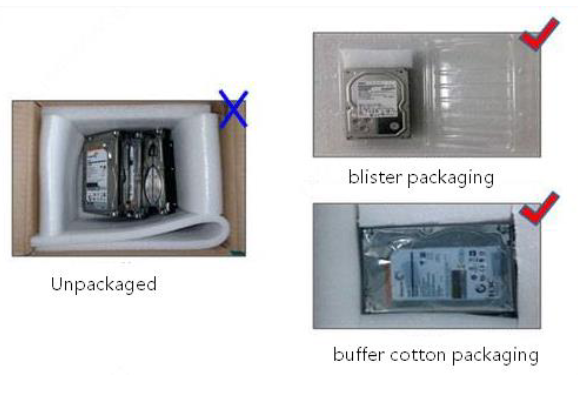
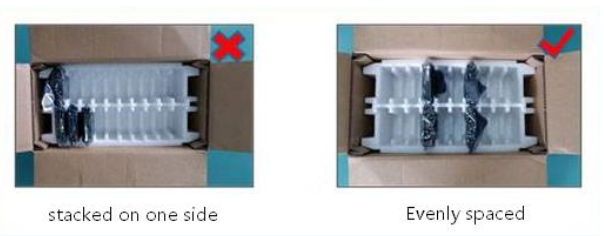
- Ensure even weight distribution within the package, avoid stacking items to one side
- Leave space between items
Vendor Shipment Checklist
Before sending items to Vendor
General Guidelines
- Confirmation from vendor to ship the items/received shipping labels
- Double check if the serial numbers belong to the vendor
- If items are being sent for repair, check with vendor if outer/retail packaging is necessary.
- Else, remove and store retail box in RMA-WH under RMA service tag
ASRock
- Remove any retail packaging and store it in RMA-WH under RMA service tag.
- ONLY send inner packaging/anti-static cover
Return Shipment Checklist
Before returning items after Repair/Diagnosis to Customer
General Guidelines
- Confirmation from customer to ship/deliver the items
- For shipments outside mainland, consider clubbing the shipment with next order
- Item should be in same condition as received from customer
ASRock Vendor Repairs
- Retrieve retail packs stored under RMA service tag in RMA-WH
- Repack the items in retail packaging received from customer