When installing third-party PWM fans, like from Noctua, into a supermicro motherboard, you will probably get loud fans or fans that are spinning up and down. Fan control options in the BIOS and the IPMI interface is very basic and switching between the fan modes might still not fix the issue.
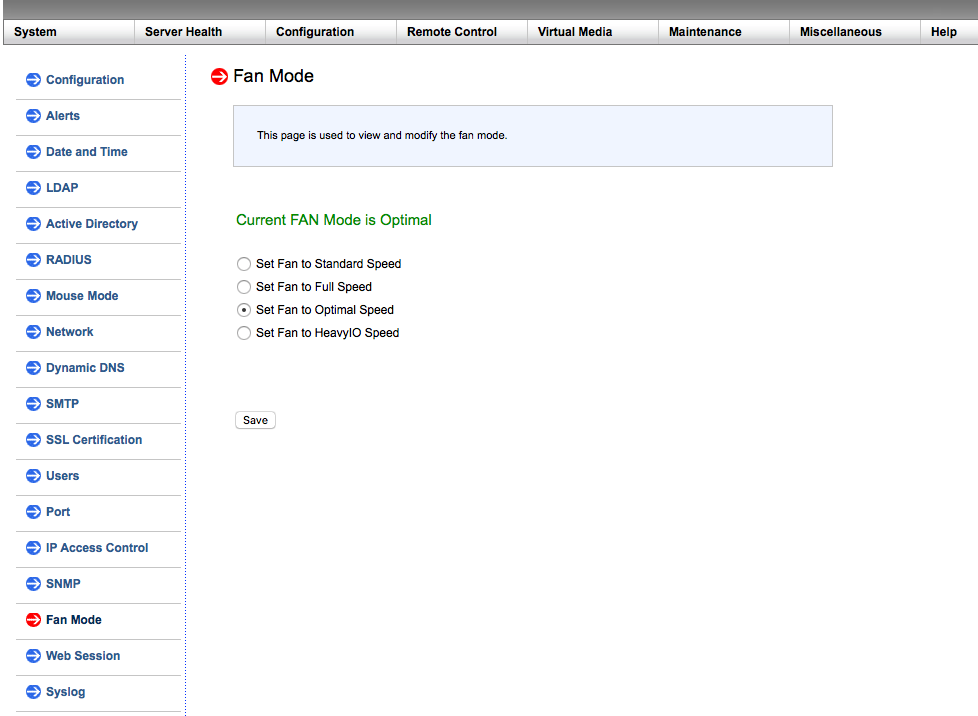
Figure 1: Fan modes in a typical Supermicro IPMI GUI
The Reason
Third-party fans have a lower minimum rotation speed than the OEM fans from Supermicro. For example, Noctua NF-A12x25 fans can ramp down to 450rpm whereas the Supermicro FAN-0077L4 can only come down to ~700rpm.
At Idle, the Supermicro motherboard upon receiving a PWM signal that the third-party fan is running at 450 rpm, which is below the critical value for the OEM fan, assumes the fan is broken and sends a 100% fan signal. which causes the fan to ramp up and then down again in a loop.
The Fix
Boot to a live ubuntu environment and install
ipmitool:
sudo apt update && sudo apt install ipmitool
change the PWM header's critical rpm values:
sudo ipmitool sensor thresh FAN1 lower 150 225 300

FAN1 – FAN header for which you want to set the values
150 – lower non-recoverable value
225 – lower critical value
300 – lower non-critical value
Repeat the last command for FAN2, FAN3.. corresponding to the number of PWM headers on the motherboard.
After you run the command for all fan headers on your Supermicro motherboard – shutdown and disconnect the power cord and leave it off for few minutes. After you power it on again, the fans should work normally.
Applying the Fix remotely over the network
Change the command to include the IPMI interface address as below:
sudo ipmitool -I lan -U ADMIN -H 10.100.10.200 sensor thresh FAN1 lower 150 225 300
You will be asked for IPMI password after this entering command.
Related Articles
How to apply RMA on Supermicro Portal.
The following information we need to collect from the customer before applying for RMA on Supermicro portal. 1: Fully filled Mbuzz RMA Form. 2: Correct P/N(Server),S/N(Server), Invoice Copy, complete description of an error, troubleshooting steps ...
Supermicro - Frequently Asked Questions
1. Is it possible to get a list of all EOL models in the Supermicro Website? Or is there any list that you can share on a periodic basis? Ans. Supermicro don’t have such list available to share. They can provide the information on a case-to-case ...
What does the Supermicro 'BEEP' codes mean and what does the flashing 'LEDs' indicate?
Why does Servers / Computers output beep codes or flash LEDs? All computers (Servers, workstations, laptops, AIOs, etc.) goes through a process called POST (Power-on Self-Test) checks when powered on. This is the process of the computer to check its ...
Personal Computers and Servers - Classification and Point of Contact
We can classify the computers that MBUZZ handles based on their form-factor as below: Tower Workstations, Desktops, Gaming PCs and SFF (Small form factor) PCs fall under this category. These are computers people would use on a desk and rarely move. ...
How to register online case with Supermicro
Use the following link to go on the support platform of Supermicro. https://webpr3.supermicro.com/SupportPortal/Default 1: Create an account try to use your office mail ID as we will get all the case info on registered mail ID. 2: Add all details and ...
Recent Articles
Troubleshooting NVSM Alert NV-CPU-XX – Unrecoverable CPU Internal Error
Purpose This document provides a general troubleshooting procedure for the NVIDIA System Management (NVSM) alert NV-CPU-XX, which indicates that a CPU has reported an internal error. The article outlines how to verify whether the alert represents an ...
PCIe Gen5 Switch Board Replacement
1. Objective The objective of this Method of Procedure (MOP) is to safely replace the defective PCIe Gen5 Switch Board in the Supermicro server while minimizing system downtime and ensuring all PCIe devices, including GPUs, NICs, NVMe drives, and ...
Local Boot Support for DGX H200 with BCM 11
Overview This Knowledge Base (KB) article explains the supported method for deploying and managing a DGX H200 system using Bright Cluster Manager (BCM) 11 while booting the operating system from the node's local NVMe storage. To be managed by BCM, ...
Execution of NVIDIA Field Diagnostic (FD) Tool and Collection of Diagnostic Logs, and troubleshooting of GPU(s) not detected
1. Objective To provide a standardized procedure for executing the NVIDIA Field Diagnostic (FD) tool, verifying GPU status, collecting the required diagnostic logs, and documenting the findings for further analysis. 2. Scope This procedure applies to ...
Fiber Optic Bend Radius Measurement and Compliance
1. Purpose This article outlines the procedure for verifying that installed fiber optic cables comply with minimum bend radius requirements. Proper verification prevents signal degradation, ensures optimal optical performance, and protects the ...